

Contraserv Helps Small Business Owners Tackle EMP501 Bi-Annual Submissions
Employer Interim Reconciliation Declarations Due 31 October 2024 | SARS Implements New e@syFile Platform
Feeling overwhelmed and struggling to navigate your 2025 Interim Reconciliation Declaration (EMP501) Submission — you’re not alone!
Contraserv knows many small business employers can relate, and we want to help alleviate your burden.
In an admirable effort to streamline the submission process, the South African Revenue Service (SARS) has launched the e@syFileTM version 7.4.3 which incorporates Business Requirement Specifications (BRS) updates and offers an improved user experience.
However, expecting busy employers to master software updates, platform interface changes, and new payroll regulations during the bi-annual filing season may prove too taxing and negate any time-saving and reporting-accuracy gains.
At Contraserv, our goal is to provide South African employers peace of mind come tax season. Registered tax practitioner and payroll administrator specialists, the Contraserv team are dedicated to ensuring accuracy and compliance in preparing and processing employer declarations.
Outlined below is a basic summary of the submission process. We also answer five frequently asked questions regarding e@syFile platform changes pertinent to the 2025 Interim Employer Filing Season.

Shipshape Documentation Your Mainstay for Submission Success
Firstly, ensure you have all the correct information and documentation before starting the EMP501 submission process.
The 2025 Bi-Annual Interim EMP501 submission period opened on 16 September and closes on 31 October 2024, covering the first half of the reconciliation year (1 March 2024 to 31 August 2024). All private and public employers must reconcile and submit their EMP501 to SARS via e@syFileTM Employer or eFiling.
Information & Documentation Required: (1 March-31 August 2024)
- Monthly Employer Declarations (EMP201)
- Employee IRP5/IT3(a) tax certificates
- Accurate Payroll Information
- Employer Payment and Liability Information
It is important to note that tax contribution values on all EMP201s must square with interim IRP5/IT3(a) generated:
- Pay-As-You-Earn (PAYE)
- Unemployment Insurance Contributions (UIC)
- Skills Development Levy (SDL)*
- Employment Tax Incentive (ETI) Information*
* When applicable.

EMP501 Reconciliation Submission Process Basic Outline:
- Download e@syFileTM Employer version 7.4.3
- Import employee tax certificate CSV (comma-separated values) files
- Enter monthly liabilities, payments and ETI information
- Check all details are correct
- Submit and certify EMP501 reconciliation process completed
Contraserv can assist you in all aspects of the declaration and filing process.
1. My e@syFile download has a virus; can I file my EMP501 on the old version?
No, and Yes, and Maybe Not?
No ~ The latest version of the e@syFileTM Employer does not have a virus. Set your anti-virus system to accept the new application. Tax practitioners and payroll administrators download e@syFileTM Employer version 7.4.3.
| Number of Employees | Interim or Annual Submission | Latest e@syFileTM Employer | Old version eFiling |
| Less than 50 | Interim |  |
|
| More than 50 | Both | |
 |
| Five or less* | Interim | |
|
| 2025 Annual EMP501 Declarations | YES | NO |
Yes ~ Employers filing for 50 or fewer employees can use the new or old eFiling applications to submit the 2025 interim declaration.
Maybe Not ~ Larger enterprises processing 50 or more IRP5/IT3(a) certificates can only use the new software.
*SARS makes an exception for employers with a maximum of five employees and offers assistance with EMP501 interim submissions by appointment at a local SARS branch.
From the 2025 annual declaration (1 March 2024-28 February 2025) onward, only submissions made via the new e@syFile version will be accepted, regardless of business size.
2. My data is not showing on the new e@syFile Employer; how do I import employee IRP5/IT3(a) certificates from my old e@syFile?
Electronic employee tax certificates (.csv file format) can be imported from your payroll system.
You can also upload your database from your old e@syFile application using the ‘Retrieve Certificate History’ function. Additional certificates not yet captured on any system must be entered manually.
3. Must I use the ‘Accept Data’ option for ETI and employer contribution and liability entries; why are there warnings when I select the ‘Own Values’ function?
Employers have the option of selecting ‘Own Values’ and working offline to manually capture their monthly liability and payment financials (excluding penalties and interest) on a blank EMP501 form.
Requesting this EMP501 format on the SARS Reconciliation Page will trigger two alerts about the dangers of inaccurate data capture before allowing you to proceed.
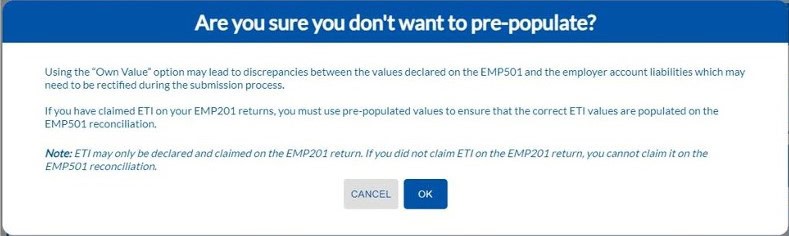
Image: Screenshots SARS e@syFile EMP501 Declarations ‘Own Values’ First Alert
If ETI is declared, employers must use the ‘Accept Data’ function which pre-populates all fields with information and financial values from the EMP201 returns and automatically calculates certificate totals. The software also incorporates the latest BRS updates: source code 3926 added (two-pot retirement savings withdrawal benefit); source codes 2039 and 3137 removed (employer/employee fax numbers).
SARS recommends this automated option to avoid costly errors and related penalties.

4. What happens if I enter inaccurate details or miss the EMP501 filing deadline?
Failure to submit an accurate interim EMP501 on time will trigger administrative penalties and may constitute a criminal offence, carrying a fine or a maximum two-year prison sentence. Penalties equate to 1% of the annual PAYE liability and increase monthly by 1%, capped at 10% of annual PAYE.
Don’t run afoul of the law!
Spend extra time checking the details of your declaration before submitting.
5. How do I know if my EMP501 submission is successful?
After submitting, you can view your declaration status on the EMP501 Reconciliation Status Dashboard — ‘Pending’ changes to ‘Submitted’. Sizeable submissions will remain on the Reconciliation Work Page* for a few minutes before passing validation.
Employers are responsible for verifying submission success.
* Scroll down to updated guides for more information — PAYE-easyFileG01.
Still all at Sea?
Locally based, Contraserv offers employers comprehensive outsourced payroll and post-payroll solutions.
Service excellence at an affordable price.
Our team specialise in preparing and processing EMP501 submissions accurately and on time. We have a detailed understanding of South African tax laws and keep current on payroll reporting regulations.
Choosing our professional service reduces the burden of payroll administration and allows you to focus on what you do best — grow your business.
Disclaimer: The information provided in this article is not a comprehensive guide or legal reference. Readers requiring assistance with payroll reporting should refer to qualified professionals for advice.